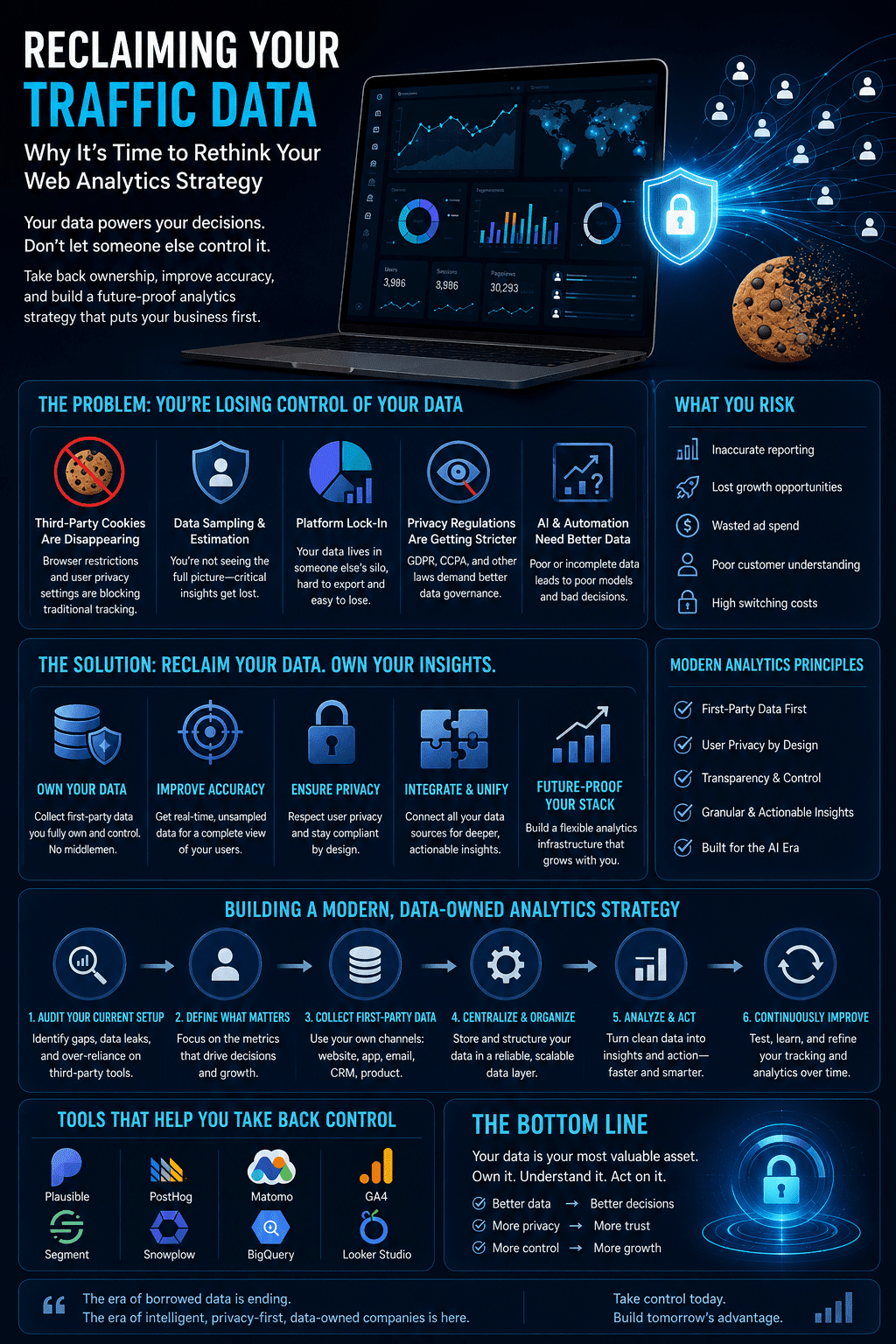
Reclaiming Traffic Data: Why Reconsider Your Analytics Strategy
For over a decade, digital marketers, SEO specialists, and business owners relied on a single, shared standard for measuring website performance. It wasn’t perfect, but it was predictable. However, the forced transition to Google’s latest analytics iteration completely disrupted this baseline. Instead of an upgrade, many growth teams found themselves staring at a complex, counter-intuitive […]

For over a decade, digital marketers, SEO specialists, and business owners relied on a single, shared standard for measuring website performance. It wasn’t perfect, but it was predictable. However, the forced transition to Google’s latest analytics iteration completely disrupted this baseline. Instead of an upgrade, many growth teams found themselves staring at a complex, counter-intuitive interface plagued by data sampling, thresholding, and frustrating 24-to-48-hour processing delays. In this article, we’ll explore why you should reconsider your web analytics strategy to get better traffic data.
Compounding this technical friction is the aggressive shift toward user privacy. Between local regulations like GDPR and CCPA, and Safari’s strict tracking limitations, relying solely on cookie-dependent ecosystems has become a liability. Cookie banner rejection rates vary significantly by region and industry, but independent research has repeatedly found rejection rates high enough, often in the range of a quarter to nearly half of visitors depending on the market, that your marketing dashboard can meaningfully understate real traffic. To regain absolute visibility into campaign performance without sacrificing compliance, forward-thinking companies are actively searching for a reliable google analytics 4 alternative that delivers clean, un-sampled, real-time data.
The Data Gap: Where Traditional Tracking Falls Short
The core issue with modern web tracking isn’t just user experience—it is data accuracy. When a user declines consent on a traditional cookie popup, they completely disappear from your analytics. Your server logs might show thousands of active sessions, but your marketing reports show a ghost town. This discrepancy makes it practically impossible to calculate accurate conversion rates, scale paid media effectively, or evaluate localized organic growth.
Furthermore, managing multi-channel campaigns requires flawless attribution, which inherently relies on precise campaign tagging. In the past, executing a standard Google Analytics UTM tracking strategy was enough to map out a basic user journey. You appended your source, medium, and campaign parameters, and waited for the reports to populate.
Today, however, that setup introduces significant friction. If you are operating within a platform that delays data processing by two days, optimization becomes reactive rather than proactive. If you launch an influencer campaign or a time-sensitive paid ad set today, you cannot afford to wait 48 hours to find out if your tags are capturing traffic correctly or if your landing page has a technical glitch. Marketers need immediate, real-time verification to protect their ad spend.
What GA4’s reporting delay actually involves
The frustration with GA4’s processing time is legitimate and worth grounding in Google’s own documentation rather than leaving as an anecdotal complaint. Google’s own Analytics Help documentation confirms that standard GA4 reports are not real-time by design, and that data can take up to 24 to 48 hours to fully process and appear in standard reports, particularly for properties with higher traffic volume or more complex event configurations. GA4 does offer a separate Realtime report for a narrower set of metrics, but the detailed segmentation, custom dimensions, and full attribution modeling most marketers actually need for campaign decisions live in the standard reports, which carry the longer delay.
This matters practically, not just as a complaint about GA4’s interface. A time-sensitive campaign, an influencer post, a flash sale, a paid social push with a 48-hour flight window, can complete its entire lifecycle before GA4 has fully processed the data needed to evaluate whether it worked. That is the specific, verifiable version of the “reactive rather than proactive” problem this article already points to, and it’s worth stating plainly rather than leaving as a vague frustration.
A Modern Approach to Cookieless Tracking
The solution to the privacy-vs-data dilemma lies in shifting from heavy, intrusive tracking scripts to privacy-first, first-party data collection. This is precisely why modern platforms like ObserviX Web Analytics are gaining massive traction as viable google analytics 4 alternatives.
By utilizing anonymized session fingerprinting instead of depositing tracking files onto a visitor’s browser, some cookieless analytics implementations can reduce or, in certain jurisdictions and configurations, eliminate the need for a cookie consent popup specifically for analytics purposes. Whether that applies to your specific setup depends on your jurisdiction, your data retention practices, and the exact technique the tool uses, so this is worth confirming directly with the vendor’s compliance documentation rather than assuming “cookieless” automatically means “consent-exempt.” See the compliance section below for more detail. This cookieless approach can meaningfully close the gap between your analytics dashboard and your actual backend traffic, since it doesn’t depend on a visitor actively consenting to a cookie to be counted. The exact size of that gap varies by site and audience, which is itself a reason to compare your analytics numbers against server logs or backend order data directly rather than assuming a fixed recovery percentage.
Additionally, streamlining your infrastructure simplifies campaign management. Instead of wrestling with custom explorations just to audit your marketing funnel, advanced analytics dashboards parse incoming traffic automatically. The system handles google analytics 4 utm tracking logic natively and instantly, breaking down sessions into clear categories like Paid Search, Social, Organic, and Email the second a click occurs.
Comparing the main GA4 alternatives on the market
Since “GA4 alternative” is inherently a comparison-shopping search, it’s worth actually naming the field rather than treating one vendor as the only option.
- Plausible Analytics is an open-source, lightweight tool built specifically around a single-page dashboard and no cookie banner requirement for standard analytics use, since it doesn’t use cookies or collect personally identifiable information by default. It’s popular with smaller sites and developers who want something they can self-host.
- Fathom Analytics takes a similar privacy-first, cookieless approach, with a strong emphasis on GDPR and CCPA compliance documentation and a simple, non-technical dashboard aimed at marketers rather than data analysts.
- Matomo is one of the most established players in this space and offers both a cloud-hosted and fully self-hosted, on-premises option, which matters for organizations with strict data residency requirements, since self-hosting means traffic data never leaves infrastructure you control.
- Piwik PRO is positioned more toward mid-size and enterprise organizations with dedicated compliance requirements, offering a consent management layer built directly into the platform alongside analytics.
- PostHog differs from the others by combining analytics with product usage tracking, session replay, and feature flagging in one platform, which suits product-led SaaS teams more than a pure marketing-analytics use case.
- ObserviX, the platform this article centers on, positions itself around real-time processing speed and native UTM handling, which is a genuine differentiator if fast campaign feedback is your top priority, though it’s worth evaluating that claim, and any GA4 alternative’s specific performance claims, against your own traffic patterns rather than taking any vendor’s marketing copy at face value.
The right choice depends heavily on what you’re actually optimizing for: self-hosting and data ownership, out-of-the-box compliance documentation, product analytics depth, or processing speed. No single tool wins on all four simultaneously.
What “cookieless” actually means for your compliance obligations
This is worth addressing directly, because it’s the part of the “switch to cookieless analytics” pitch that gets oversimplified most often, including earlier in this article before the correction in Fix 2 above.
“Cookieless” describes the technical mechanism, not the legal outcome. A tool that doesn’t store a traditional cookie file on a visitor’s browser can still process personal data through techniques like device fingerprinting, and several regulators have been explicit that this distinction matters less than marketing copy often implies. The UK’s Information Commissioner’s Office, in its guidance on storage and access technologies, states clearly that the relevant UK regulation, PECR, applies broadly to any technology that stores or accesses information on a user’s device or that uses techniques like fingerprinting to identify and track that device, not narrowly to cookies alone. The EU’s ePrivacy framework, which UK PECR was originally derived from, takes a similar broad view across most member states.
What this means practically: switching to a cookieless analytics tool may reduce your consent obligations, particularly if the tool genuinely avoids storing anything on the visitor’s device and processes data in a way that qualifies for a narrow statistical-purposes exemption, but it does not automatically eliminate them. The specific answer depends on exactly what the tool collects, how long it retains that data, whether it can identify a specific individual across sessions, and which jurisdiction’s rules apply to your visitors.
Before treating “no cookie banner required” as a settled fact for your business, ask any analytics vendor for their specific compliance documentation covering your relevant jurisdictions, and if analytics is a meaningful part of your data processing footprint, a brief legal review is worth the cost relative to the risk of an incorrect assumption. This is also worth reading alongside broader coverage of how data privacy regulation intersects with AI and automated systems on this site, since many analytics platforms now incorporate AI-driven segmentation and prediction features that carry their own separate compliance considerations beyond the tracking mechanism itself.
Web Analytics Strategy Turning Real-Time Data into Strategic Adjustments
When your web analytics engine operates with less than a 3-second delay, your entire approach to growth optimization changes. Growth teams can monitor live dashboards to see exactly how traffic segments navigate the site, identify high-bounce entry points on the fly, and run immediate quality assurance checks on live campaigns.
The strategy is straightforward and requires zero technical debt. A lightweight tracking script (under 5KB) integrates seamlessly into platforms like Shopify, WordPress, or Webflow within five minutes, running asynchronously without damaging your Core Web Vitals or mobile page speed.
Ultimately, web analytics shouldn’t require a degree in data engineering just to answer a simple question: Where is our traffic coming from, and what are they doing right now? By upgrading to a dedicated, real-time analytics framework, companies can finally stop guessing, bypass the limitations of legacy ecosystems, and make confident, data-backed decisions that drive measurable revenue.
A practical checklist for evaluating any GA4 alternative
Whichever platform you’re considering, running it through the same set of questions produces a more reliable comparison than reading feature lists in isolation.
- Data ownership and export. Can you export your full historical data in a usable format if you switch tools again later? Some platforms make this straightforward; others make migration deliberately difficult.
- Data residency. If you operate in the EU, UK, or another region with data localization expectations, confirm where the analytics data is actually processed and stored, not just where the company is headquartered.
- Sampling and thresholding behavior. GA4’s data sampling and thresholding on smaller segments is one of its most common complaints. Ask directly whether the alternative you’re evaluating samples data at any traffic tier, and at what volume that kicks in.
- UTM and campaign tagging support. Confirm the tool handles standard UTM parameters natively and correctly categorizes traffic sources without requiring extensive manual configuration, since inconsistent attribution defeats much of the point of switching tools.
- Consent and compliance documentation. Per the compliance section above, ask for the vendor’s specific documentation on which jurisdictions their tool qualifies for a consent exemption in, rather than accepting a general “cookieless means compliant” claim.
- Pricing model as you scale. Many analytics tools price by monthly pageviews or events. Model your cost at double or triple your current traffic before committing, since pricing tiers can shift the total cost of ownership significantly as a site grows.
- Integration with your existing stack. Confirm the tool connects cleanly with your CMS or ecommerce platform, your ad platforms for conversion tracking, and any BI or reporting tools your team already relies on.
Running a genuine side-by-side trial, keeping both GA4 and a candidate alternative live simultaneously for a few weeks, remains the most reliable way to validate any of these claims against your actual traffic before fully committing.
Web analytics strategy FAQ
No, GA4 remains Google’s active, supported analytics platform, and Google has continued shipping updates to it. The frustration many marketers express isn’t about GA4 disappearing, it’s about its reporting delay, data sampling on smaller segments, and interface complexity compared to the older Universal Analytics standard it replaced.
Not automatically. Whether a specific cookieless analytics tool qualifies for a consent exemption depends on exactly what data it collects and processes, and under which jurisdiction’s rules. Regulators including the UK’s ICO have made clear that consent requirements under laws like PECR can apply to fingerprinting and similar techniques, not just traditional cookies. Confirm the specific compliance position with any vendor you’re evaluating rather than assuming the label “cookieless” settles the question.
Data sampling occurs when GA4 analyzes a representative subset of your data rather than every single session, typically on higher-volume properties or more complex custom reports, in order to return results faster. This can produce reports that differ slightly from your total actual traffic, which is part of why some businesses find their GA4 numbers don’t perfectly match their backend order or lead data.
This varies by the complexity of your existing event tracking and how many custom conversions or audiences you’ve configured. A straightforward site with basic pageview and conversion tracking can often be migrated and validated within a few days to a week. Sites with extensive custom event tracking, ecommerce integration, or multiple ad platform connections should budget several weeks to properly test and validate the new setup against GA4 in parallel before fully switching over.
Beyond the cookie question, evaluate data residency (where your data is actually stored and processed), whether the vendor is transparent about their specific compliance certifications for your operating regions, how long they retain raw data, and whether their business model depends on reselling or aggregating your visitor data in ways that could conflict with your own privacy commitments to your users.
Infographic