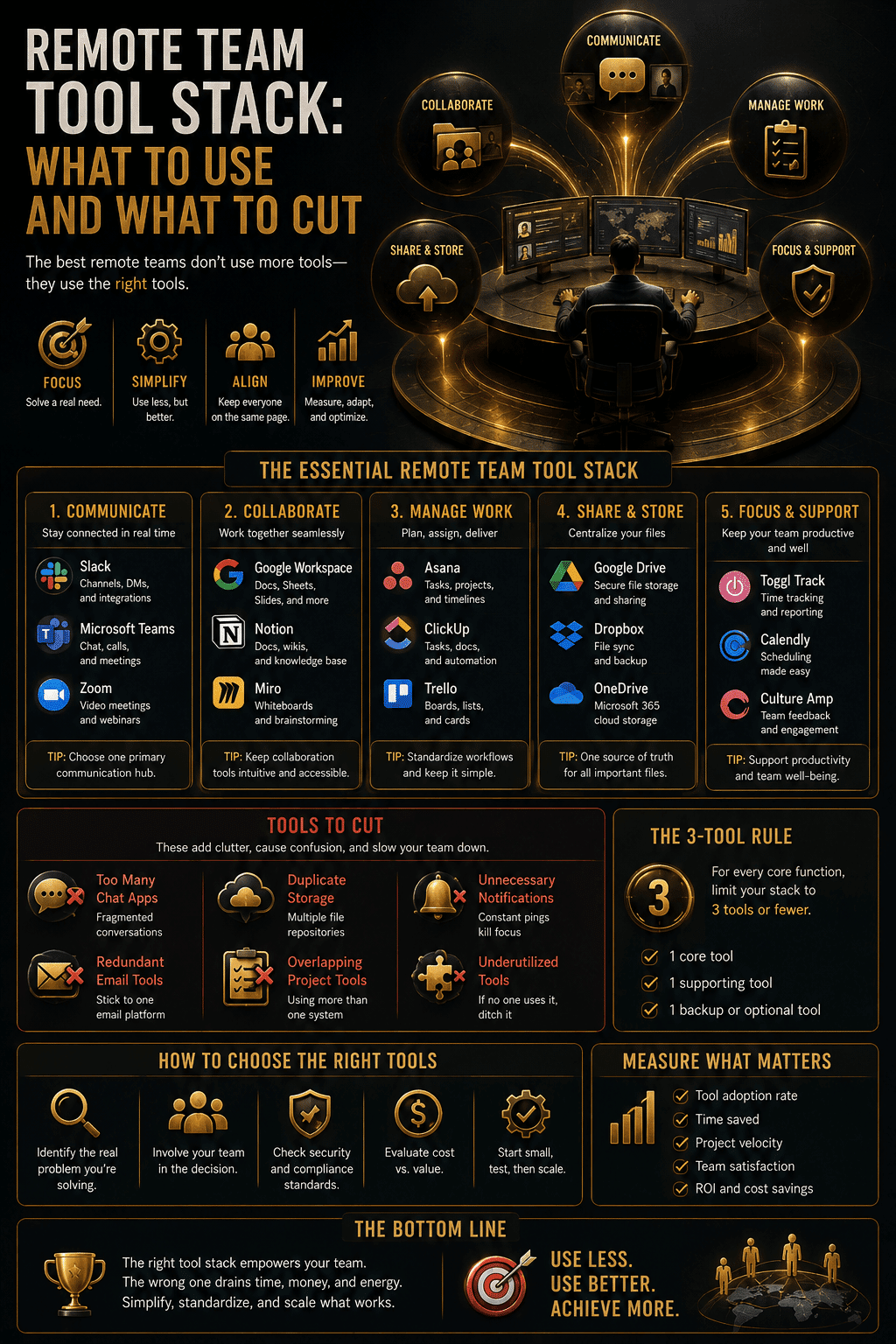
Remote Team Tool Stack: What to Use and What to Cut
The average worker switches apps 1,200 times a day. How to build a remote team tool stack small enough to actually work.

Online teams can grow quickly. A small group may begin with email, shared documents, and occasional video meetings, but these simple methods often become difficult to manage as more employees, clients, and projects are added.
This challenge is especially common for teams working across Asian markets. Members may operate in different countries, languages, time zones, and regulatory environments. They may also rely on separate platforms for communication, project management, customer support, research, file storage, and reporting.
Digital tools can make distributed work more efficient, but using too many disconnected services can create confusion. A practical resource system helps teams understand which platform supports each task, where official information is stored, and how frequently used websites can be reached without repeated searching.
What Tool Sprawl Actually Costs
The case for keeping a tool stack small is usually made as a feeling. It has been measured.
Researchers studied 20 teams totalling 137 users across three Fortune 500 companies for up to five weeks. They found the average worker toggled between applications and websites roughly 1,200 times each day. Each individual switch costs a little over two seconds, which sounds like nothing. Across a day it adds up to just under four hours a week spent reorienting, roughly 9% of total working time.
One example from the study makes the scale concrete. At a Fortune 500 consumer goods company, executing a single supply-chain transaction required each person involved to switch about 350 times between 22 different applications and websites. Over an average day, one employee toggled more than 3,600 times.
McKinsey research puts a second number alongside it: knowledge workers spend close to two hours a day searching for and gathering information scattered across tools, drives, inboxes and chat threads. That is more than a full working day each week spent locating information rather than using it.
The counts driving this keep rising. BetterCloud’s tracking puts the average enterprise at 291 SaaS applications, up from 254 in 2023 and 110 in 2020. Okta puts the average company at 89. The gap is mostly organisation size; the direction of travel is the same.
Two things follow that change how you should read the rest of this article.
Adding a tool is never free, even when the tool is free. Every platform added creates another notification source, another set of conventions, another place information can hide. The licence cost is usually the smallest part of the bill.
Consolidation has a ceiling. A large share of daily switching is between genuinely different functions and cannot be removed. What can be removed is the overlap: the second chat tool, the third place files live, the dashboard nobody opens. That is where the recoverable time sits.
One caveat on this literature, since it affects how much weight to give it: most figures circulating on SaaS sprawl are published by companies selling consolidation software. The HBR and McKinsey studies are the exceptions, and they are the ones worth citing.
Begin With the Team’s Core Workflows
The first step is to identify how work moves through the organization. A typical workflow may begin with a customer request, continue through planning and production, and end with review, delivery, invoicing, and ongoing support.
Each stage should have a clearly assigned tool. Communication may take place in a team messaging platform, while tasks are recorded in a project-management system. Files may be stored in a shared workspace, and completed work may be delivered through a separate customer portal.
Teams should avoid adding a new service every time a small problem appears. Before adopting another platform, they should confirm that an existing tool cannot perform the same function. Reducing unnecessary overlap makes training and daily work easier.
What a Small Team Actually Needs
Six functions cover almost every distributed team. The specific products matter less than the discipline of one tool per function.
| Function | What it does | Common options |
|---|---|---|
| Real-time messaging | Short internal discussion, quick coordination | Slack, Microsoft Teams, Discord |
| Async video and meetings | Planning, training, recorded walkthroughs | Zoom, Google Meet, Loom |
| Project and task management | The single source of truth for what is happening | Asana, Linear, ClickUp, Trello, Jira |
| File storage | Working files, approved files, archive | Google Drive, Dropbox, SharePoint |
| Documentation | Onboarding, procedures, decisions | Notion, Confluence, Google Docs |
| Credentials | Shared access without shared passwords | 1Password, Bitwarden, Keeper |
Teams already running on WordPress can cover several of these functions from inside the site rather than adding platforms, which is worth checking before you buy anything: the current options are covered in this rundown of AI plugins for WordPress.
Three notes on choosing.
Several of these overlap deliberately. Notion can hold documentation and light project management. Google Workspace covers files, docs and meetings. A team of eight can reasonably run four tools rather than six, and should.
The integration between tools matters more than the features inside them. Two platforms that pass information to each other automatically beat three better platforms that require someone to copy between them, because the copying is where the four hours a week goes.
The same rule holds for the AI tools individual team members add on top of this core. Our guide to building a lean AI productivity stack covers which jobs to hand to AI and how to keep those tools from multiplying the switching problem.
Cost scales differently than it looks. A per-seat tool at $10 a month is $960 a year for eight people and $6,000 for fifty. Review this against actual usage annually, not at renewal, because renewal is when you have no leverage and no time.
The test before adding anything: which existing tool would have to fail at this task for the new one to be necessary? If you cannot name it, you are adding overlap.
Create a Central Communication Structure
Online teams often use several communication channels at once. Email may be appropriate for contracts and formal client messages, while instant messaging is better for short internal discussions. Video meetings may be used for planning, training, and sensitive conversations.
The team should establish clear rules for each channel. Important decisions should not remain only inside a temporary chat conversation. They should be recorded in the relevant project page, task, or official document.
Communication guidelines are particularly important when members work in different time zones. Messages should include enough context for colleagues to respond without waiting for another meeting or clarification.
Use Project Management Tools as the Source of Truth
A project-management platform should show what needs to be done, who is responsible, and when the work is expected to be completed. Tasks should include clear descriptions, supporting files, deadlines, and status updates.
When information is divided between spreadsheets, messages, and personal notes, team members may work from different versions of the plan. A central system reduces this risk and gives managers a clearer view of progress and workload.
The structure should remain simple. Too many custom fields, labels, and status categories can make the platform harder to maintain than the work itself.
Organize Shared Files Consistently
Shared storage becomes difficult to navigate when employees create folders and file names according to personal preferences. Teams should agree on a basic naming structure for clients, projects, dates, and document versions.
Working files, approved files, and archived versions should remain clearly separated. Terms such as “final,” “latest,” and “new version” are unreliable when several revisions exist.
A convention that survives contact with real work looks like this:
CLIENT_Project_Document_YYYY-MM-DD_v01For example: ACME_Rebrand_BrandGuidelines_2026-03-14_v03
Three rules make it hold. Dates go year first, so files sort chronologically by default. Versions are numbered, never named, since “final” and “latest” stop meaning anything at the third revision. And the client or project code comes first, so search works even when someone has forgotten where the file lives.
Write the convention into the onboarding document rather than announcing it once in chat. A naming standard that exists only in a message from eight months ago is not a standard.
Access permissions should also reflect job responsibilities. Team members should receive the information needed for their work without automatically gaining access to every client record, financial document, or administrative folder.
Create an Organized Starting Point for Website Resources
Online teams use many websites beyond their main collaboration platforms. Employees may need research services, translation tools, regional news, design references, business directories, cloud dashboards, customer platforms, and public information websites.
Build the library around function rather than around who bookmarked what. A working structure has three tiers: approved business tools that everyone uses, project and client references, and regional resources that apply to specific markets. Anything that fits none of those categories probably belongs in someone’s personal bookmarks rather than the shared library.
Every saved resource should include a short explanation. Labels such as “official government reference,” “translation tool,” “regional market research,” or “client reporting platform” help employees select the right destination without opening several similar websites.
Separate General Tools From Regional Resources
Some digital platforms can be used across the entire organization, while other resources apply only to a particular country or market. Keeping these categories separate makes the collection easier to navigate.
Regional sections may include tax authorities, company registries, local payment services, logistics providers, employment guidance, and market-specific communication platforms. Each entry should identify the relevant country and language.
Language matters as much as country here. A team member working in Korean will reach local services faster through a Korean-language index than through an English list translated after the fact, which is why some teams keep a language-specific navigation entry alongside the regional section. https://boostpro.net is one example of that kind of categorized starting point. Whatever you list, the internal library stays focused on approved business tools and operational documentation rather than trying to duplicate a general directory.
Teams should confirm important legal, financial, and regulatory information through official sources. General articles may provide useful context, but they should not replace current guidance from the responsible authority.
Develop a Practical Knowledge Base
Repeated questions should be converted into reusable documentation. A team knowledge base may include onboarding instructions, standard operating procedures, software guides, customer-service policies, and troubleshooting steps.
Each article should have a clear owner and review date. Outdated instructions can cause more problems than missing documentation, particularly when software interfaces or internal processes have changed.
Knowledge-base articles should be written for the person who needs to complete the task. Clear steps, screenshots, examples, and expected outcomes are generally more useful than long explanations of internal history.
Choose Tools That Work Across Devices
Online team members may work from desktops, laptops, tablets, and smartphones. Core platforms should function reliably across the devices employees are expected to use.
Mobile access is especially important for communication, urgent approvals, customer support, and status checks. However, complex editing and administrative tasks may still be better suited to larger screens.
Teams should test important workflows rather than relying only on a platform’s feature list. A tool may advertise mobile support while making essential functions difficult to use outside a desktop browser.
The extreme version of this test is running the business from somewhere with unreliable connectivity, which surfaces every weak point in a stack quickly. The practical version of that setup is described in this account of automating client acquisition while working remotely.
Protect Accounts and Business Information
A growing team creates more user accounts and access points. Shared passwords should be replaced with individual accounts whenever possible. Multi-factor authentication should be enabled for email, storage, financial, administrative, and customer-management systems.
Credentials should be stored in an approved password manager rather than spreadsheets, chat messages, or project notes. Access should be removed promptly when an employee or contractor no longer works with the organization.
Teams should also review the data-handling policies of external tools before uploading confidential client files or internal business information. Convenience should not override privacy, security, or contractual obligations.
Where data lives matters as much as who can reach it, and for teams handling regulated or client-confidential material the hosting question becomes a design decision rather than a procurement one. The tradeoffs are covered in this comparison of cloud APIs against on-premise infrastructure on latency, cost and security.
Review Tools as the Team Grows
A platform that works well for five people may become restrictive or expensive when the team grows to twenty or fifty. Tools should be reviewed periodically according to actual usage, cost, reliability, integration, and support quality.
Duplicate services should be reduced, inactive accounts removed, and outdated website resources archived. Employees can provide useful feedback about which tools save time and which create unnecessary steps.
The goal is not to build the largest possible collection of digital services. It is to create a manageable system in which every tool and website has a clear role.
Good Organization Supports Sustainable Online Growth
Growing online teams need more than communication software. They need clear workflows, reliable documentation, organized files, secure access, and a practical way to reach frequently used resources.
When tools are selected intentionally and online references are categorized clearly, distributed teams can work with greater consistency across locations and time zones. Employees spend less time searching for information and more time completing meaningful work.
A simple, well-maintained digital structure gives growing teams the flexibility to expand without allowing their daily operations to become unnecessarily complicated.
Remote Team Tools: Common Questions
Fewer than you have. Six functions cover most distributed teams: messaging, meetings, project management, file storage, documentation and credentials. A team under ten can often consolidate to four, since several platforms cover more than one function. The useful discipline is not a target number but a rule: nothing gets added until someone can name which existing tool fails at the task.
Harvard Business Review research with Soroco found workers toggle between applications around 1,200 times a day, losing close to four hours a week to reorientation alone, roughly 9% of working time. McKinsey separately found knowledge workers spend nearly two hours a day searching for information across scattered systems. Not all of that is recoverable, but the portion caused by overlapping tools is.
Suites reduce switching and integration work, and they concentrate risk. If Google Workspace or Microsoft 365 covers most of your functions adequately, the consolidation usually beats a collection of individually better tools. The exception is where a specialist function is core to your business, since a suite’s version of it is generally adequate rather than good.
Annually, against actual usage rather than perceived need. Pull login data or seat activity, identify anything unused for ninety days, and check for functional overlap. Do this well ahead of renewal dates, because reviewing at renewal means deciding under time pressure with no leverage.
Individual login credentials. Use a password manager with per-person access and role-based permissions instead. When someone leaves, access removal should be one action in one system rather than a hunt through a dozen platforms, and shared logins make that impossible.
Separate general platforms from regional requirements explicitly. Communication, project management and documentation are usually global. Payments, tax filing, employment compliance and some communication channels are jurisdiction-specific and change independently. Keep regional resources in a clearly labelled section with the country and language attached, and confirm regulatory information through the relevant authority rather than a saved article.
Infographic