Local AI Infrastructure for Business: Cost, Hardware, Break-Even
The break-even math for local AI infrastructure, what VRAM you actually need, and a 90-day test before you spend anything on hardware.

Three years ago, running AI models on your own hardware was a hobby. You needed a research budget, a spare rack, and someone on staff who genuinely enjoyed compiling CUDA drivers on a Friday night. Everyone else called an API, paid per token, and got on with their week.
That calculation has quietly flipped for a large and growing set of businesses. Not because the cloud stopped working, but because three separate pressures arrived at the same time: inference volumes grew past the point where per-token pricing is comfortable, regulators started asking pointed questions about where data physically sits, and open-weight models got good enough that the quality gap stopped being an excuse.
The result is a shift most companies have not planned for. Teams that built their entire AI stack on a single vendor’s API are discovering that their fastest-growing cost line is one they have no leverage over, and that their compliance team has questions they cannot answer. Meanwhile, the machines needed to run capable models locally have dropped in price and complexity to the point where a mid-sized company can stand up a serious inference node for less than the cost of one senior engineer.
What used to demand a vendor relationship and a six-month procurement cycle is now a catalogue purchase. Local AI infrastructure sized for inference rather than training is available off the shelf, and the gap between deciding to run AI locally and actually doing it is now measured in weeks rather than quarters.
This article covers what local AI infrastructure actually means in practice, what it costs, where it pays back fastest, and the situations where staying in the cloud is still the smarter call.
The short version: local AI infrastructure wins when your inference volume is steady, when your data cannot legally leave your perimeter, or when round-trip latency is part of your product. It loses when demand is spiky, when you need frontier reasoning, or when nobody on your team has time to own a GPU driver upgrade at 2 a.m.
Table of contents
- What “Local AI Infrastructure” Actually Means
- What VRAM Actually Decides
- The Cost Curve That Broke the Cloud-Only Assumption
- Running the Break-Even on Your Own Numbers
- Data Residency Stopped Being a Legal Footnote
- Cloud AI Versus Local AI Infrastructure: An Honest Comparison
- Latency, Uptime, and the Cost of a Dead Connection
- What a Local AI Stack Actually Requires
- Where Local Infrastructure Pays Back Fastest
- The Honest Case Against Going Local
- The Hybrid Pattern Most Companies Land On
- How to Test This in 90 Days Without Buying a Rack
- Frequently Asked Questions About Local AI Infrastructure
What “Local AI Infrastructure” Actually Means
The term gets stretched to cover very different setups, which makes budget conversations confusing.
At the simplest end, local AI means running a small language model on hardware your team already owns. A workstation with a modern GPU can run a 7B or 13B parameter model comfortably, handling summarization, classification, extraction, and internal search without a single packet leaving the building. Plenty of useful business automation lives entirely at this tier.
The middle tier is a dedicated inference server or a small cluster sitting in your own server room or a colocation facility. This is where most serious on-premise AI infrastructure lands. You are running larger open-weight models, serving multiple concurrent users, and probably fine-tuning on your own data. Power, cooling, and networking start to matter, and the physical requirements for AI data centers become a real line item rather than an afterthought, because GPU clusters draw constant heavy load in a way traditional business servers never did.
At the far end sits private cloud and sovereign AI: dedicated tenancy, air-gapped environments, hardware you own operating under contracts that guarantee jurisdiction. This tier is mostly defense, healthcare, banking, and government, and it is expensive.
Most businesses reading this belong in the first two tiers. The mistake is assuming the third tier’s cost profile applies to them, which kills the conversation before anyone runs the numbers.
What VRAM Actually Decides
The tier descriptions above are useful for budget conversations. Turning them into a purchase order requires one number: VRAM.
Model weights have to fit in GPU memory before anything else happens. That single constraint decides which models you can run, which decides your hardware bill, which decides everything downstream. Nothing else in the stack is as binding.
The arithmetic is simple. Weights at 16-bit precision need roughly two bytes per parameter, so a 70B parameter model wants about 140GB of VRAM. Quantization compresses that. At 4-bit the same model lands near 40GB with quality loss that is real but small for most business tasks, and that is the difference between a rack of data center accelerators and a workstation under a desk. Quantization is not a reluctant compromise. It is standard practice for local serving, and it is almost always the right move before dropping to a smaller model.
Two things eat headroom that people forget to leave. Long context windows grow the KV cache, which lives in VRAM alongside the weights and scales with both context length and concurrent requests. And concurrency is itself memory: serving eight people at once is a different problem from serving one.
| Tier | Working VRAM | What it serves | Realistic scope |
|---|---|---|---|
| Single workstation GPU | 12 to 24 GB | 7B to 14B at 4-bit | One team: drafting, classification, extraction |
| Dual GPU workstation | 48 to 64 GB | 32B comfortably, 70B at 4-bit | Department assistant, RAG over internal docs |
| Single-socket GPU server | 80 to 192 GB | 70B at higher precision, MoE models | Company-wide, meaningful concurrency |
| Multi-node cluster | 300 GB and up | Frontier-class open weights, fine-tuning | Product-embedded inference, regulated workloads |
Two rules that save money.
Start one tier below your instinct. Teams consistently overestimate the model size their tasks need. A 14B model grounded in your own documents beats a 70B model reasoning from nothing, and it costs a quarter as much to serve.
Buy for concurrency, not peak model size. The failure mode in production is almost never “the model is not smart enough.” It is six people hitting the endpoint at once and everybody waiting. Benchmark batch throughput in tokens per second across concurrent requests before you purchase, because vendors quote single-stream numbers.
This matters more as agentic systems spread, since one user request can fan out into dozens of model calls. Our comparison of AI agents for work automation covers how per-task token consumption behaves in production, which is the input driving both your VRAM sizing and the cost math in the next section.
The Cost Curve That Broke the Cloud-Only Assumption
Here is the counterintuitive part. Inference has gotten dramatically cheaper, and that is precisely why local infrastructure now makes sense.
Stanford’s 2025 AI Index Report documented a more than 280-fold drop in the cost of querying a model performing at GPT-3.5 level, falling from twenty dollars per million tokens in late 2022 to seven cents by October 2024. The same research tracked hardware costs declining roughly 30% per year while energy efficiency improved around 40% annually, and found the performance gap between open-weight and closed models narrowing from eight points to under two on some benchmarks in a single year. Those figures describe a two-year window that has already closed, and the direction has not reversed since.
Read those numbers together and the implication is uncomfortable for cloud-first architectures. Capability that used to require a frontier model now runs on something you can host yourself, on hardware that gets cheaper every quarter, using models you can download.
Meanwhile, total AI spending keeps climbing, because cheaper tokens mean teams use vastly more of them. That is the trap. Per-unit costs fall, consumption grows faster, and the monthly invoice goes up regardless. Companies tracking AI vendor economics and revenue trends will recognize the pattern from the provider side: inference is the growth engine, and someone is paying for it.
The crossover math is straightforward. If you are running a high-volume, repetitive workload, document classification, transcript processing, product description generation, ticket routing, then you are paying a per-token rate on work whose marginal cost on your own hardware is close to electricity. At sufficient volume, a machine you bought once beats an invoice that arrives every month forever.
The threshold is lower than most teams expect. A workload burning a few thousand dollars monthly in API calls often justifies dedicated hardware within a year, and the hardware keeps working after that.
Running the Break-Even on Your Own Numbers
The threshold claim above is only useful if you can check it against your own invoice. Four inputs decide it.
Monthly token volume. Pull it from your provider dashboard, not from an estimate, then compare it against what you assumed. The gap is usually the most useful thing you learn all quarter.
Blended cost per million tokens. Input and output are priced differently and output is typically several times more expensive. Weight them by your real ratio, because a summarization workload and a code generation workload have very different blends.
Amortized hardware. Full purchase price divided by 36 months, including chassis, system memory, drives and networking. Not the GPU price alone. The GPU is usually about half the invoice.
Running cost. Power draw at load times hours times your utility rate, plus cooling, plus rack or colocation fees, plus the fraction of an engineer who keeps it alive. Budget that last item at 10% to 25% of an FTE for a single node. It is the line that sinks most spreadsheets.
Local wins when:
(amortized hardware + monthly running cost) < (monthly tokens × blended cloud rate)
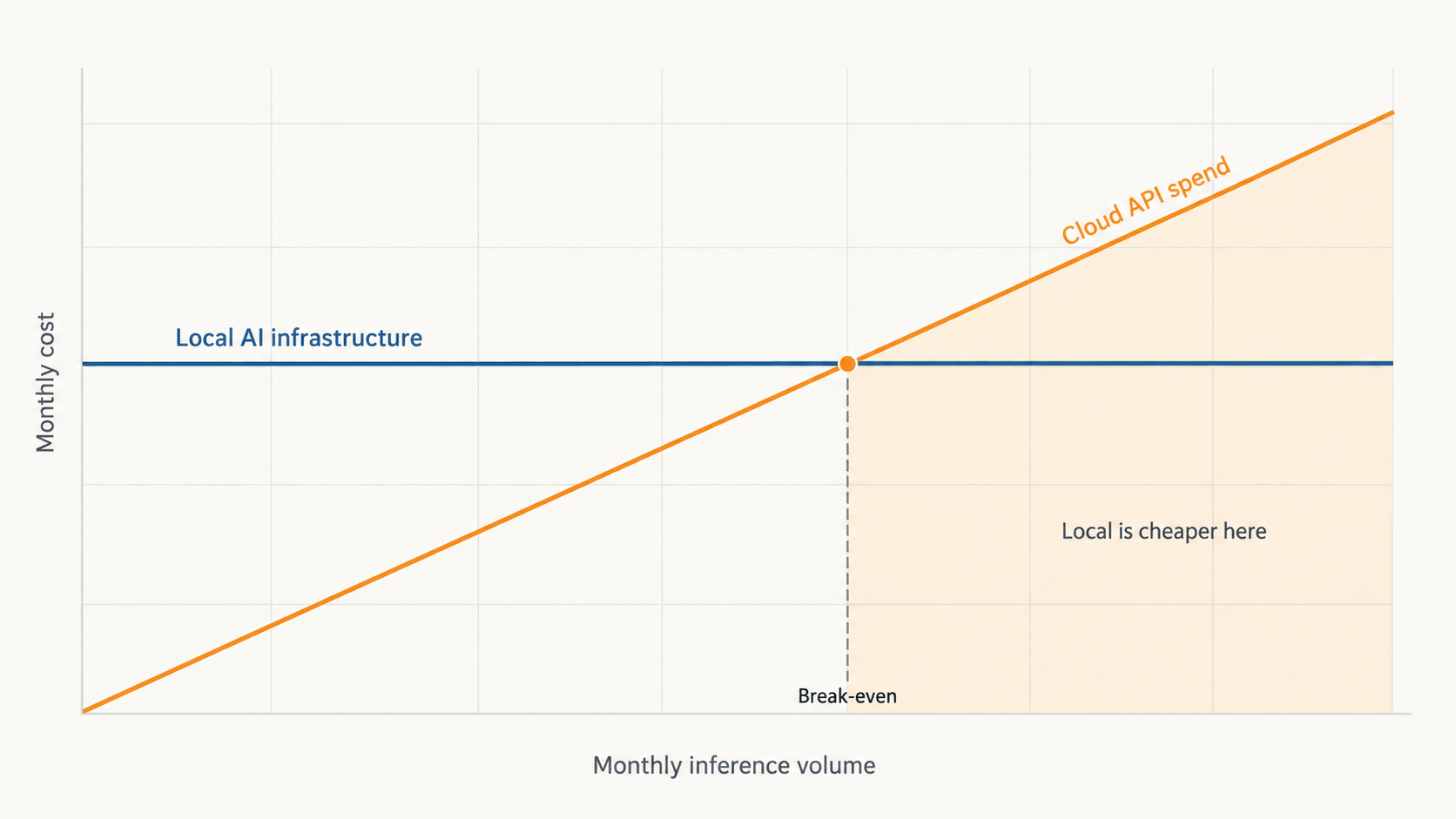
Two properties of that inequality do the real work.
The left side is fixed. It does not care whether you run 10 million tokens this month or 400 million. The right side is linear in usage. So the question is never “is local cheaper,” it is “at what volume does local become cheaper,” and that answer moves every time you add a workflow.
The second is the one teams miss. Utilization is the whole game. A GPU node idle 20 hours a day has an effective cost per token roughly six times higher than the same box running a steady queue. Local AI infrastructure is a bet on volume, not a cost saving. If you cannot keep the hardware busy, you have bought a very expensive space heater.
This is also why the structural case has strengthened independently of hardware prices. Gartner forecasts that worldwide AI-optimized IaaS spending will reach $42 billion in 2026, with inference at $23.3 billion overtaking training at $19 billion for the first time. Training is bursty and belongs in someone else’s data center. Inference is steady state, and steady state is exactly the workload shape that amortizes owned hardware well.
For the latency and security half of this decision in more depth, including the specific failure modes of on-prem appliances, see Cloud APIs vs. On-Prem AI Appliances.
Data Residency Stopped Being a Legal Footnote
Cost gets attention in the boardroom. Compliance is what actually forces the decision.
When you send a customer record to a third-party API, you have made a data transfer, and someone eventually has to document it. That was manageable when AI was a pilot project. It becomes a real problem when AI is embedded in twelve production workflows touching customer data, employee data, medical records, or financial transactions.
The European Commission’s AI Act framework introduced obligations that scale with risk level, and enforcement is now active. Sector-specific rules in healthcare and finance often go further, requiring that processing happen within named jurisdictions and sometimes within named facilities. Governance frameworks such as the NIST AI Risk Management Framework give organizations a structured way to document AI risk, but documentation gets considerably easier when the honest answer to “where does this data go” is “nowhere.”
Local AI infrastructure collapses an entire category of compliance work. There is no cross-border transfer to assess, no subprocessor to audit, no retention clause to negotiate, no question about whether your prompts became training data. The prompt hits a machine you own and the response comes back.
This is why regulated industries moved first, and why their choices are worth studying even if you are not regulated yet. Legal counsel who spent 2024 writing careful AI usage policies are increasingly recommending on-premise deployment for anything touching sensitive records, on the simple logic that the cheapest compliance problem is the one you designed out.
Cloud AI Versus Local AI Infrastructure: An Honest Comparison
| Dimension | Cloud AI APIs | Local AI Infrastructure | Hybrid Architecture |
|---|---|---|---|
| Upfront investment | Near zero, pay as you go | Significant capital or leasing commitment | Moderate, sized to steady-state volume |
| Marginal cost per query | Fixed per-token rate, permanent | Electricity and amortization only | Low for routine work, metered for peaks |
| Cost predictability | Poor, scales with usage and vendor pricing changes | High, known after purchase | Good, with a capped variable tier |
| Data residency | Depends on vendor terms and region | Complete, data never leaves your network | Controlled by routing policy |
| Latency | Round trip plus queueing, typically 200ms to 2s to first token | First token often under 100ms | Local for hot paths, cloud for the rest |
| Model access | Frontier models, updated by the vendor | Open-weight models you select and pin | Both, chosen per task |
| Version stability | Vendor may deprecate or silently update | You control exactly when anything changes | Stable locally, current in the cloud |
| Peak capacity | Effectively unlimited | Capped by hardware you own | Local baseline with cloud burst |
| Operational burden | Minimal, vendor handles everything | Real, needs infrastructure skills on staff | Highest complexity, two systems to run |
| Failure mode | Vendor outage stops your workflow | Hardware failure stops it, and it is yours to fix | Degrades rather than stops |
| Best fit | Low volume, variable demand, frontier reasoning | High volume, sensitive data, predictable load | Most mid-sized and larger organizations |
Latency, Uptime, and the Cost of a Dead Connection
Latency sounds like an engineering concern until you watch a person wait.
A retail associate scanning a product and waiting two seconds for an AI response will do it twice and then stop using the tool. A support agent whose assistant lags behind the conversation loses the thread. A quality inspection camera on a production line cannot wait for a round trip to a distant region, and neither can a warehouse robot deciding whether to stop.
Local inference removes the network from the critical path. First tokens land in tens of milliseconds instead of hundreds, and because the response streams as it generates, the user sees something happening almost immediately rather than watching a spinner while a request crosses the country and comes back. That gap is the difference between a tool people use and a tool people work around.
Connectivity failure is the sharper version of the same problem. Cloud-dependent AI has a single point of failure that sits outside your control, and it is not only your own connection. Provider outages, regional degradation, and rate limiting during peak demand all produce the same experience for your users, which is nothing happening. Teams that have thought carefully about mobile connectivity and offline fallbacks in AI-driven workflows usually reach the same conclusion: anything a person depends on to do their job needs a local path that works when the link does not.
For distributed operations, retail locations, clinics, factories, vehicles, remote sites, this is not an optimization. Sites lose connectivity. If AI is embedded in the work, the work stops with it.
What a Local AI Stack Actually Requires
The honest answer is more than a GPU and less than a data center.
Field note, tested September 2026. We ran this before writing it, deliberately at the floor of the hardware range rather than on a showcase rig: Llama 3.1 8B Instruct at Q4_K_M, served through Ollama on a single RTX 3060 with 12GB of VRAM, pointed at a multi-step agent pipeline parsing 8,000-token documentation payloads. Two things went differently than expected. Generation speed held up better than we assumed, at roughly 42 tokens per second, but time to first token quadrupled once prompt history crossed 4,000 tokens, settling around 3.8 seconds of prompt processing before a single word appeared. And under parallel requests, Ollama silently dropped part of our system prompt instead of raising an error, which degraded output quality with no signal that anything had gone wrong. Neither failure appears in a vendor benchmark, because vendor benchmarks measure single-stream generation on short prompts. Size your expectations around prefill time and concurrency behavior, not around the tokens-per-second figure on the spec sheet.
Compute. Inference is far less demanding than training, which is the single most misunderstood fact in this conversation. Many businesses assume they need training-grade clusters because that is what appears in industry news. Serving a quantized model to a few dozen concurrent users is a different problem with different hardware, and the growing category of AI PCs and on-device AI hardware has pushed capable local inference into equipment that looks like ordinary office kit.
The serving runtime. This is the layer that turns a model file into an endpoint, and for most teams the choice matters more than the model choice. Ollama is the fastest path from nothing to a working endpoint and is where most pilots start. llama.cpp underpins much of that ecosystem and runs well on CPU and Apple silicon. vLLM is the production answer once you have real concurrency, because its continuous batching and paged attention deliver several times the throughput on identical hardware. TensorRT-LLM extracts more from NVIDIA cards at the cost of a harder build. Open WebUI is the usual front end, and it brings the role-based access control your security team will ask about on day one.
Models. Open-weight families worth evaluating include Llama, Mistral, Qwen, DeepSeek and gpt-oss. Pin a version and record it. One underrated advantage of local deployment is that nothing changes underneath you until you decide it does, which matters a great deal once a prompt chain has been tuned against specific model behavior.
Retrieval. Most of the business value comes from grounding a model in your own documents rather than from raw model capability, which means a RAG pipeline: an embedding model, a vector database, a chunking strategy and usually a reranker. The useful part is that the retrieval half wants RAM and CPU rather than GPU, so it can live on far cheaper hardware than the inference node. Our breakdown of VPS and VDS hosting for private LLMs and RAG covers where that split makes financial sense.
Networking and interconnect. This is where multi-GPU plans quietly fail. The moment a model spans more than one card, tensor parallel inference moves activations between GPUs on every forward pass, and a slow link can make two accelerators slower than one. Inside a chassis that means NVLink or a full-bandwidth PCIe topology rather than the shared lanes on a consumer motherboard. Across nodes it means high-speed Ethernet or InfiniBand, not the office switch. Storage sits in the same category: a 70B checkpoint pulled from spinning disk turns a 30 second cold start into several minutes, which users experience as the AI being broken, so NVMe for the model library is not optional. When you are specifying AI infrastructure hardware, the networking and storage line items belong in the first draft of the budget, not in the revision after the first benchmark disappoints.
Power and cooling. AI hardware runs hot and runs constantly, unlike traditional business servers that idle most of the day. A pair of high-end GPUs under sustained load will trip a standard office circuit. Check amperage and thermal headroom before the hardware arrives, not after. A closet with a door is not a server room.
Operations. Model management, monitoring, access control and an update process. This is where local deployments genuinely cost more than an API key, and pretending otherwise leads to abandoned hardware. Budget for the person who owns it, not only for the box.
Where Local Infrastructure Pays Back Fastest
Certain workload profiles justify the investment far more quickly than others:
- High-volume repetitive processing. Document extraction, transcription, classification, tagging, and translation at scale, where the same operation runs thousands of times daily on predictable inputs.
- Regulated data handling. Patient records, financial transactions, legal documents, HR files, and anything covered by residency requirements or contractual data-handling clauses.
- Real-time operational systems. Manufacturing quality control, logistics routing, in-store assistance, and any workflow where a two-second delay changes user behavior.
- Proprietary knowledge work. Internal search and retrieval across confidential documentation, source code, contracts, or research that you would rather not send anywhere.
- Disconnected or unreliable environments. Field operations, remote facilities, vessels, vehicles, and locations where connectivity is intermittent by nature.
- Fine-tuned domain models. Cases where a smaller model trained on your data outperforms a general frontier model on your specific task, which happens more often than vendors advertise.
The Honest Case Against Going Local
Local AI infrastructure is wrong for a lot of businesses, and pretending otherwise would be useless to you.
If your AI usage is exploratory, low volume, or unpredictable, buying hardware is a mistake. You will pay for idle capacity while a per-token bill would have cost less than the electricity. The cloud is genuinely better at variable demand, and it always will be.
If your work depends on frontier reasoning quality, the hardest analysis, the most complex code generation, the longest context windows, then the best available open-weight models are still behind the leading proprietary ones on those specific tasks. The gap has narrowed considerably but it has not closed, and it reopens each time a new frontier model ships.
If you have no infrastructure capability in-house, do not start here. Local deployment means someone owns patching, monitoring, capacity planning, and the 2 a.m. failure. Companies that skip this end up with expensive hardware running a stale model that nobody has updated in eight months, which is worse than either alternative.
There is also a real opportunity cost in attention. Time your team spends becoming competent at model serving is time not spent on the application layer, which is where nearly all the business value actually lives.
The Hybrid Pattern Most Companies Land On
In practice, few organizations go fully local, and the ones that try usually walk it back.
The pattern that survives contact with reality is routing by workload. Sensitive, repetitive, and latency-critical tasks run on local infrastructure. Complex reasoning, low-volume specialized work, and anything needing the newest capabilities routes to a cloud API. A routing layer makes the decision per request based on data classification, complexity, and current load.
This gets more valuable as agentic systems spread. When AI agents handle multi-step business workflows, a single user request can trigger dozens of model calls, most of them small and mechanical: parsing, checking, formatting, deciding what to do next. Running that chatter locally while sending only the genuinely hard reasoning steps to a frontier model changes the economics of agentic AI substantially, and it keeps intermediate data, which often contains the most sensitive context, inside your network.
The architectural benefit is resilience. When the cloud provider has a bad day, hybrid systems degrade to local-only operation instead of stopping. Users notice slightly lower quality on hard questions rather than a page that will not load.
How to Test This in 90 Days Without Buying a Rack
Start with measurement, not procurement. Pull ninety days of API usage and separate it by workload. You are looking for the boring, high-volume, low-complexity tasks that consume most of your tokens while requiring the least intelligence. In most organizations that bucket turns out to be the large majority of total spend, and it is exactly what runs well locally.
Then run a single workstation pilot. One machine, one open-weight model, one workload from that list. Measure output quality against your current cloud results with real business data and real reviewers, not benchmarks. The blind scoring method we use to evaluate AI assistants works well here: same tasks, same prompts, and outputs labeled A and B so reviewers don’t know which one ran locally. You will learn within two weeks whether the quality holds, and that answer is worth more than any vendor comparison.
Price the full picture before scaling. Hardware, power, cooling, the serving stack, and the fraction of a person needed to keep it healthy. Compare that against twelve, twenty-four, and thirty-six months of your current spend at projected growth, not current volume, because AI usage rarely stays flat.
Design the fallback before you need it. Every local workload should have a defined cloud path for hardware failure and maintenance windows. Teams that build this in from the start move to production. Teams that treat it as a later problem tend to stall at pilot.
Frequently Asked Questions About Local AI Infrastructure
Any setup where AI models run on hardware you control, inside a network boundary you define. That ranges from a single workstation running a small language model to a dedicated GPU cluster in your own facility. The defining characteristic is that inference happens on your equipment and your data does not leave your network to get processed.
It depends almost entirely on volume and consistency. For steady, high-volume workloads, local hardware typically reaches breakeven somewhere between twelve and twenty-four months, and everything after that is upside. For low or highly variable usage, cloud APIs stay cheaper indefinitely because you never pay for idle capacity. Run the comparison on your own token usage rather than trusting either side’s marketing.
For most business tasks, yes. Summarization, classification, extraction, structured generation, translation, and retrieval over your own documents are handled well by current open-weight models. The gap remains real on the hardest reasoning, the most demanding code generation, and very long context work, which is exactly why hybrid routing has become the common architecture instead of a full replacement.
Work backwards from VRAM. A 12GB to 24GB workstation GPU runs 7B to 14B models at 4-bit quantization, which covers drafting, classification, and extraction for a small team. We ran an 8B model at Q4_K_M on a 12GB card successfully, so treat 12GB as the genuine floor rather than a marketing minimum. A 70B model at 4-bit needs roughly 40GB, so two 24GB cards or one 48GB professional card. Serving a department means a dedicated server with 80GB or more, adequate system memory and NVMe storage. The critical distinction is that inference needs far less hardware than training, so do not size your purchase against training benchmarks.
No. It removes an entire category of risk by eliminating third-party data transfers, which makes compliance considerably simpler, but you still need governance: access controls, audit logging, output monitoring, risk documentation, and a clear policy on acceptable use. Frameworks like the NIST AI RMF exist because the obligations follow the AI system regardless of where it runs.
Plan on a meaningful fraction of one experienced infrastructure engineer for a single-node deployment, and at least one dedicated person once you are serving multiple production workloads. The heaviest work is initial setup. Ongoing effort is patching, monitoring, capacity planning, and periodic model updates. Organizations that skip this staffing question are the ones whose hardware ends up idle.
Sometimes, and the deciding factor is rarely company size. A ten-person legal practice processing confidential documents all day has a stronger case than a two-hundred-person company using AI occasionally for marketing copy. Look at data sensitivity and query volume rather than headcount.
Buying hardware before measuring workloads. Teams get excited, purchase a capable machine, and then discover their actual usage was low volume and highly variable, which is the profile the cloud serves best. The second most common mistake is treating deployment as a one-time project instead of an ongoing responsibility, which produces infrastructure running an outdated model nobody has touched in months.
A serving runtime and a front end at minimum. Ollama is the quickest way to a working endpoint and suits pilots. vLLM is the production choice once multiple people are using the system, because its batching gives you far more throughput on the same GPU. llama.cpp is the CPU and Apple Silicon path. Open WebUI is the common interface layer and handles user roles. If you are grounding the model in your own documents, you also need an embedding model and a vector database, both of which run happily on CPU.
Yes. Once model weights are downloaded, an air-gapped deployment runs entirely offline, which is the deciding factor for defense, industrial control, and some clinical environments. Plan the update path before you commit, because in an air-gapped setup, model updates and security patches become a manual, documented process rather than a background task.
