Open Box vs Refurbished vs Used: Four Ways to Buy Cheap Electronics, Ranked by Risk
Four ways to buy cheap electronics, ranked by how much you know before you pay, plus the checks that catch faults in used hardware.

Every city has the same four channels for cheap electronics, and they are not interchangeable. Manufacturer outlets, bin stores, marketplace listings and graded open box retailers differ in one variable that matters far more than the discount: how much you know about the specific unit before you pay. Price is downstream of that.
It is why two people can buy the same used laptop model for the same amount and end up with completely different outcomes. One bought a unit with a stated condition grade, a listed accessory inventory and a return window. The other bought an assertion from a stranger.
This guide ranks the four channels by risk rather than by discount, explains what open box, refurbished and used actually mean when a seller uses those words, and gives you the specific checks that expose a tired battery, a worn drive or a thermally abused GPU before the transaction is final. We cover it here for one reason: We cover it here for one reason: a growing share of the people buying second hand GPUs and workstations are doing it to run models locally, and that buyer has more to lose from an ungraded listing than almost anyone.
Table of contents
- Open box vs refurbished vs used: what the labels actually mean
- The four channels, ranked by what you risk
- How to tell a real grader from a repackager
- Why the right channel changes by city
- The five checks that catch a bad unit
- How you pay is part of the check
- Buying a used GPU to run AI models locally
- The ranking, for most people
- The bottom line
- Frequently Asked Questions About Buying Cheap Electronics
Open box vs refurbished vs used: what the labels actually mean
Sellers use these three words interchangeably. They should not, because they describe three completely different amounts of work done to the unit before it reached you.
Open box means the product was bought, opened and returned, then inspected and put back on sale. Nobody repaired anything, because in most cases nothing was broken. The discount is compensation for a broken seal, a missing manual, or the simple fact that it is no longer new. An honest open box listing tells you what came back in the box and what did not.
Refurbished means a process was applied. The unit was tested against a checklist, failed parts were replaced, consumables may have been swapped, and the device was returned to a defined working standard. Manufacturer refurbished is the strongest version, because the entity doing the work holds the parts, the diagnostics and the warranty exposure. Third party refurbished varies enormously, and the word on its own tells you nothing until you find the standard behind it.
Used means no process at all. Somebody owned it and now does not. Every claim about its condition is an opinion offered by a person with an incentive.
The practical test is to ask what happened between the previous owner and you. If the answer is “we inspected it and described it,” that is open box. If the answer is “we tested it, replaced what failed and we warranty it,” that is refurbished. If there is no answer, it is used, whatever the listing calls it.
Industries that resell high value components worked this out long ago. The way automotive battery suppliers verify used hybrid stock through sourcing controls, voltage testing and compatibility checks is what a real refurbishment standard looks like once the cost of getting it wrong is high enough. Consumer electronics grading is a lighter version of the same discipline, and the sellers worth buying from are the ones who borrowed the most from it.
The four channels, ranked by what you risk
| Channel | Condition info you get | Tested before sale | Returns | Price level | Best for | Avoid for |
|---|---|---|---|---|---|---|
| Manufacturer or retailer outlet | Standardised, stated by the maker | Usually yes | Yes, full retail terms | Modest discount | A specific model you already chose | Browsing, current generation bargains |
| Bin store | None | No | No | Lowest, drops through the week | Cables, cases, accessories, entertainment | Anything over about $50 or with a battery |
| Marketplace listing | Whatever the seller says | No | None | Lowest for real hardware | Simple mechanical items, visible failure modes | Batteries, screens, drives, motors |
| Graded open box retailer | Per unit grade plus accessory inventory | Usually powered on and checked | Yes, stated window | Slightly above marketplace | Anything where hidden condition costs money | Nothing, if the grading is real |
1. Manufacturer and retailer outlets
What it is: the official clearance channel. Previous generation models, overstock, and returns processed by the manufacturer or by the retailer that sold them. In practice that means Apple Certified Refurbished, the Dell Outlet, Lenovo Outlet, Best Buy Open Box and Amazon Renewed, plus the clearance sections most large chains run quietly without advertising.
What you get: the strongest documentation of any channel. Condition is stated in a standardised way, the seller is the same entity that made or sold the item, and in several cases the warranty is a real one rather than a shortened substitute. This is where the labels stop being interchangeable. Apple’s refurbished units and the outlet programmes run by the large PC makers make quite different promises from a general marketplace’s renewed programme, and those promises are the actual product you are buying. Read the specific terms on the specific listing rather than assuming the category behaves one way.
Where it goes wrong: selection. Outlets carry what the manufacturer has too much of, not what you want, and the discount on current generation hardware is thin. Stock appears and disappears within hours, which rewards checking daily and punishes browsing. Good for a specific model you had already decided on, close to useless for discovering one.
2. Bin stores
What it is: a warehouse of unsorted returns tipped into bins at a flat price that drops through the week. Everything costs the same on Monday and much less by Sunday, then the remainder is cleared and the cycle restarts. The stock almost always arrives as liquidation pallets of mixed customer returns bought by weight, and that single detail explains everything else about the channel.
What you get: entertainment, and occasionally a genuine find. Because the pallets are priced by weight rather than by contents, nobody in the chain has opened, sorted or tested anything. That is not carelessness on the store’s part, it is the business model working as designed.
Where it goes wrong: nothing is graded, nothing is tested, and nothing is returnable. You are buying an unknown object at a fixed price, which is fine for a $4 cable and irrational for a $200 device. The odds are also not neutral. Every item in that bin was returned by someone, and while plenty of returns are simple buyer’s remorse, the genuinely broken ones travel in the same pallet as the unopened ones and arrive wearing the same packaging. Bin stores are a hobby with a shopping component, not a way to acquire a specific thing.
3. Marketplace listings
What it is: individuals selling their own used equipment through Facebook Marketplace, Kijiji, Craigslist, OfferUp and local forums.
What you get: the lowest prices in the city, and the ability to inspect in person if the seller allows it.
Where it goes wrong: no recourse of any kind. “Works perfectly” is an assertion by a stranger you will never see again, and meeting to test a laptop in a coffee shop tells you it powers on, not what the battery health is.
The failure that costs people the most money in this channel is not a worn part, it is a lock. A used iPhone, iPad or Mac can be completely functional and still be permanently tied to a previous owner’s account through Activation Lock. An ex corporate laptop can pass every physical check and then quietly re enrol itself into a company’s device management the first time it reaches the internet, which nobody but that company’s IT department can undo. A handset reported lost or stolen can be blocked by carriers by IMEI weeks after you paid cash for it. None of these appear in a photograph, none are your fault, and none are fixable by you.
So the marketplace inspection starts in the message thread, not at the meeting. Ask for the serial number or IMEI before you agree to meet, and run it through the manufacturer’s own coverage lookup and a carrier blocklist checker. At the meeting, have the seller perform a full factory reset in front of you and let the device complete setup all the way to a usable home screen. A seller who will not do that has a reason, and the reason is never a good one.
Reasonable for simple mechanical items and anything whose failure modes are visible. Poor for anything with a battery, an account, or a former employer behind it.
4. Graded open box retailers
What it is: retail returns and overstock, inspected and listed individually with a condition grade against each specific unit.
What you get: the information the other three channels are missing. A real listing states which of five conditions applies: sealed, opened but complete, light wear, visible wear, or as-is where something is missing or untested. It also states what is in the box and what is not. And because it is retail, there is a return window behind it.
Where it goes wrong: you pay somewhat more than a marketplace listing for the same hardware. That gap is the price of knowing what you are buying and being able to send it back.
Two costs hide inside this channel, and both are avoidable if you look. The first is the restocking fee, which some graded sellers apply to returns and which quietly converts a return window into a partial refund. Find that number before you buy rather than after. The second is the accessory gap. A listing that honestly states “no original charger” has told you the truth and handed you a bill, and on laptops and cameras a first party replacement charger or battery can swallow a third of the discount by itself. Price the complete object, not the listed one.
How to tell a real grader from a repackager
Three tells, all visible before you buy:
- The grade is attached to the unit, not the product. “Opened box, complete, 2 cm scuff on the base, powered on and tested” describes one object. “Excellent condition” describes nothing.
- Faulty and incomplete stock lives in its own section. A seller who segregates as-is items and prices them down is grading honestly. One who blends them into general inventory is not.
- The missing-parts line exists. Absent remotes, filters and cables are named. This is the single most useful line in any listing.
Why the right channel changes by city
The four categories are universal. Which one is worth using is not. A market with three bin store chains and a thin private marketplace behaves nothing like one with the opposite mix, and pickup radius and shipping cost frequently decide whether a discount survives contact with reality. Before a first purchase in an unfamiliar city, it is worth seeing how the channels are actually distributed there. Toronto is a well documented example, and this breakdown of buying cheap electronics in Toronto maps the same four channels onto local pickup and shipping conditions.
A note on this source: the Toronto breakdown above is published by a retailer that operates in the graded open box channel, which is the channel this guide ranks first. It is linked because it is one of the few city level comparisons that covers all four channels with local pickup and shipping detail attached. There is no commercial arrangement behind the link and nothing was received for it. Read it for the local market structure, then apply the checks in this guide to anything you buy, from that seller or from anyone else.
The five checks that catch a bad unit
Every hidden failure mode in consumer electronics is hidden because it lives in a number nobody reads aloud. Here are the numbers and where to find them.
1. Battery cycle count and real capacity. On macOS, System Information under Power reports cycle count and condition directly. On Windows, run powercfg /batteryreport from a command prompt and open the HTML file it writes. Cycle count there is frequently blank, because many laptop manufacturers never expose it to the operating system at all. The figure that always works is the ratio between design capacity and full charge capacity. That ratio is the battery’s remaining health, and it is the one number a seller cannot talk you out of.
What that looks like on a real machine
Here is the report I ran on my own Acer Nitro AN517-51 in September 2026, a gaming laptop from the generation that now fills marketplace listings.
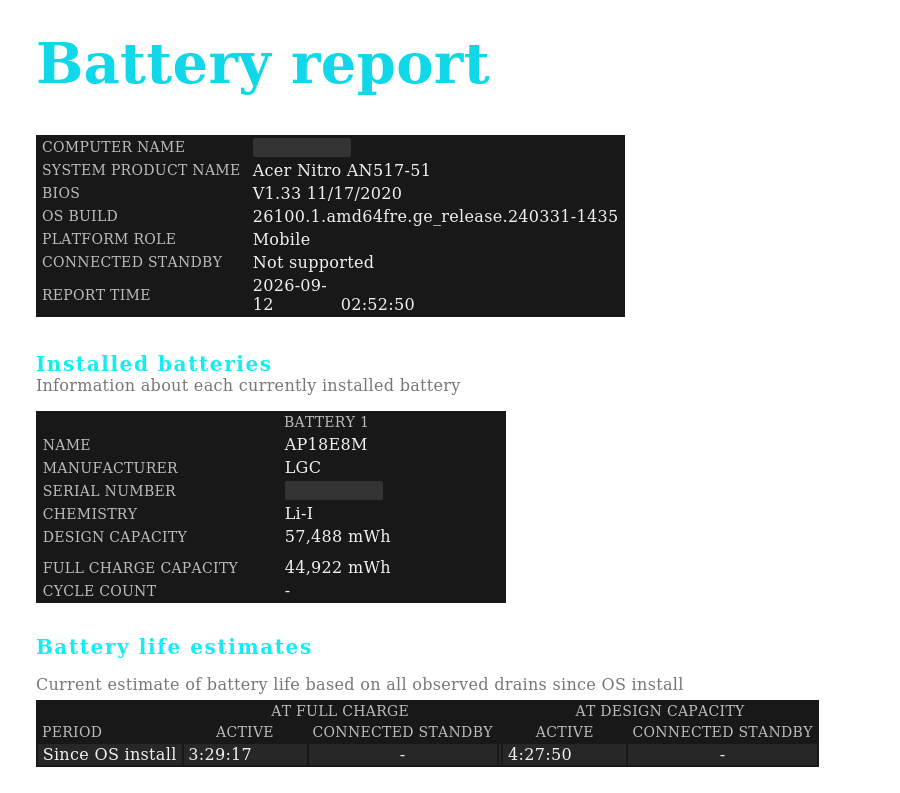
Design capacity is 57,488 mWh. Full charge capacity is 44,922 mWh. That puts the battery at 78 percent of what it shipped with. Now look at the cycle count field, which is empty, because this machine has never reported it to Windows in six years of running. Any seller quoting “low cycles” on a Windows laptop of this class is quoting a number their own hardware does not produce.
The report’s runtime projection makes that 78 percent concrete. Measured across every discharge since the operating system was installed, it estimates 3 hours 29 minutes of active use at the current full charge against 4 hours 28 minutes at the original design capacity. The degradation is not an abstraction on a spec sheet. It is roughly an hour of unplugged work that no longer exists, and on a used purchase that is a real difference between what the listing implies and what you get.
Two further things worth taking from a report like this when you are buying rather than diagnosing.
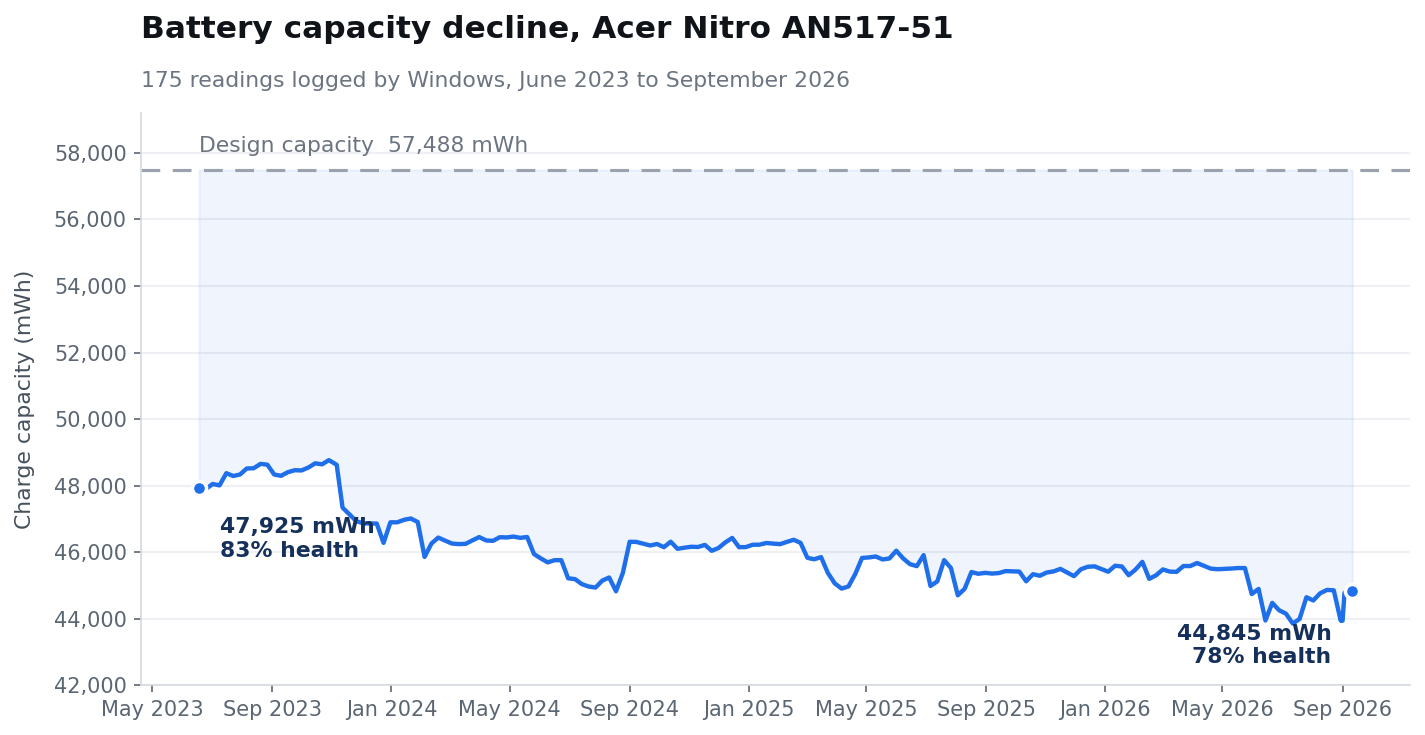
First, the weekly capacity history here runs back to June 2023 and opens at 47,925 mWh, so this pack lost around five percentage points of design capacity across three years of ordinary use. That slow, shallow curve is the shape you want. A battery that drops five points in six months is a different object with a different future, and only the history tells you which one you are looking at.
Second, that history exists only because Windows has not been reinstalled on this machine. A clean install wipes it. A wiped resale laptop will therefore show you one current reading and no trend at all, which is not suspicious by itself but does mean the snapshot is the entire body of evidence. If you can, ask the seller to generate the report before they reinstall.
2. Drive power on hours and reallocated sectors. Every SSD and hard drive reports its own age and error history through SMART. Use CrystalDiskInfo on Windows or smartctl on Linux and macOS. Backblaze’s published drive reliability data, drawn from a fleet of more than 340,000 units, shows annualised failure rates that swing sharply by model and by age, and the company explicitly recommends SMART monitoring as the early warning system. That is the case for treating power on hours as a price input rather than trivia.
3. Thermal behaviour under sustained load. Run something demanding for ten full minutes and watch the temperature curve, not the peak. A machine that throttles hard inside five minutes has a dust or thermal paste problem at best. Professional graders increasingly use the same logic found in AI computer vision diagnostics for appliance repair, where thermal imaging shows where a fault actually sits rather than only confirming that one exists.
4. Screen uniformity at full brightness. Display a full white image, then a full black one, at maximum brightness in a dim room. Backlight bleed, dead pixels, uneven panels and OLED burn in all appear instantly and never appear in a seller’s photo.
5. Every port, physically, with a real cable. Bring one USB-C cable, one USB-A device and a pair of headphones. A dead port is cheap to discover and expensive to discover later.
If a seller will not let you run checks 1, 2 and 5, the unit is being sold as untested regardless of what the listing claims.
How you pay is part of the check
Payment method is the last piece of protection available and the one people surrender most casually. A credit card carries a chargeback path that exists independently of the seller’s goodwill, which matters most in precisely the channels where goodwill is least reliable. Bank transfers, e transfers and cash carry nothing. On a marketplace meet cash is often the only realistic option, and that is fine, provided you have priced the risk rather than pretended it is absent.
The matching discipline is to use the return window instead of merely having one. A stated fourteen or thirty day window is worth nothing if you run the checks in week five. Do all of them the day the box arrives, before the device becomes the machine you depend on and sending it back turns into an inconvenience you talk yourself out of.
Buying a used GPU to run AI models locally
The used market matters more than it did five years ago, because a growing share of buyers want a machine for one specific job: running models on their own hardware. That changes the calculation in two ways.
First, the binding spec is unusually narrow. For local inference it is VRAM, not the rest of the spec sheet, that decides which models will load at all, and an older used card with more memory will run things a newer card with less memory simply cannot. This is one of the few cases where buying a previous generation used is the correct decision rather than a compromise.
Second, the wear profile is unusual. A gaming GPU has lived in bursts. A card that came out of a mining rig or a home inference box has run at sustained load with fans pinned, which is hard on thermal paste, pads and fan bearings, and completely invisible in photographs. Ask the seller directly what the card did for a living and treat a vague answer as a no.
It is also worth asking whether you need the hardware at all. The economics of owning against renting are laid out in this comparison of cloud APIs and on-prem AI appliances, and for intermittent workloads the break even point arrives much later than most buyers assume. A cheap used GPU that sits idle six days a week is not cheap.
The ranking, for most people
For a specific device you have already researched: graded open-box first, outlet second. You know the model, so you only need condition information and a way to reverse the decision.
For cables, adapters, cases and accessories: bin store or marketplace. Low value, visible failure modes, nothing to verify.
For anything with a battery, a motor or a screen: never marketplace, unless you can test it properly and accept that the test proves very little.
The bottom line
Cheap electronics is not one market. It is four, sorted by how much you know before you pay. Match the channel to the risk of the item. Graded retail for the things where hidden condition matters, bins and marketplaces for the things where it does not. Do that and the price takes care of itself.
Frequently Asked Questions About Buying Cheap Electronics
No. Open box means a returned unit was inspected and described. Refurbished means it was tested against a standard and faulty parts were replaced. Open box is a description; refurbished is a process.
For a specific model you have already researched, yes. You are paying a small premium over a marketplace listing in exchange for a stated condition grade and a return window, which is the cheapest insurance available in this market.
It depends entirely on the seller. Retailer open box usually carries a shorter return window rather than a full warranty. Manufacturer refurbished normally carries a real warranty. Always find the stated window before buying, and never assume the original manufacturer warranty transferred.
There is no fixed rule, and the honest answer is that it varies by category and by seller. The working test is simpler: compare the listing against the current new price on the same day, not against the original MSRP that sellers often quote instead. If a sealed or complete open box unit is not meaningfully below today’s new price, the discount is not compensating you for anything, and the gap should widen visibly as stated wear increases.
Buy it graded, from a seller who states the condition of that individual unit, lists what is in the box, and offers a return window. Then verify battery capacity and drive SMART data within that window rather than trusting the grade alone.
For cables, cases and accessories, yes. For anything with a battery, a screen or a motor, no. Nothing is graded, tested or returnable, which is an acceptable trade at $4 and an irrational one at $200.
Often yes, because VRAM capacity matters more than generation for local inference. Ask what workload the card ran, since sustained mining or inference use wears thermal components in ways that do not show in photos, and budget for a repaste.
A credible seller uses roughly five: sealed, opened but complete, light wear, visible wear, and as-is where something is missing or untested. Anything vaguer than that is describing a product category rather than an object.
